
Reference
Settings, units & licence
Two questions decide this page: what unit is a number in, and does the setting belong to the project or to the machine.
Units: SI on the inside
Every quantity inside inWaves is stored and computed in SI base units: metres, kilograms, seconds, pascals, newtons. The status bar says so permanently: “All computations in SI units; dB references per ISO 1683.” Levels in dB carry their reference (sound pressure re 20 µPa, ISO 1683 for the rest).
Engineering units survive only in the input fields. The label carries the unit in brackets and the conversion happens on the way in:
| Field | You type | Stored as |
|---|---|---|
| Young's modulus E [GPa] | GPa | Pa |
| Poisson's ratio ν [-] | dimensionless | dimensionless |
| Density ρ [kg/m³] | kg/m³ | kg/m³ (already SI) |
| Lengths and thicknesses, e.g. Element size (0 = gmsh automatic) | mm | m |
| Charge pressure (gauge) | bar, gauge | Pa absolute (atmosphere added) |
| Charge volume V₀ | L | m³ |
| Effective area Ae | cm² | m² |
Watch gauge pressure. A sealed cavity charged to 4 bar gauge sits at roughly 5.01 bar absolute, and the gas-law stiffness the solver derives uses the absolute value. The toast reports both.
Axes are Z-up and imported models are never rotated. The importer applies no transform of its own. If a part arrives lying on its side, it was authored that way.
Numeric fields accept a decimal comma. Typing 1,5 is read as 1.5, not as two values.
Where a setting lives
- Solver and environment settings travel inside the project file. Ray count, seat-map density, air properties, radiation bandwidth and modal damping are written into the
.iwp. Changing one marks the project unsaved. - Interface language, GPU preference and telemetry consent stay on the machine. They never enter the file.
They get your solver settings and reproduce your run. Their own language, GPU choice and privacy consent stay theirs.
The settings dialog
Open it with Settings ▸ Simulation Settings…. Simulation Settings has six tabs. Defaults restores every numeric field to the shipped value, Cancel leaves the live settings untouched, Save writes the solver settings into the project.
General
Hardware and interface: Interface language (English or Turkish), applied the moment you choose it. Solve texts follow from the next run onwards. The GPU switch is below.
Room Acoustics
The ray-tracing run and the seat map it produces.
| Field | Unit | Range | Default | What raising it buys you |
|---|---|---|---|---|
| Ray count | - | 1 000 – 500 000 | 40 000 | A less noisy seat map. Cost is linear: doubling the rays doubles the run. |
| Maximum trace time | s | 0.5 – 20 | 4.0 | Room for a long reverberation tail. Too short and T30 is truncated; roughly half the expected T30 reaches −35 dB. |
| Seat map: X divisions | - | 2 – 60 | 18 | Finer spatial detail across the audience. More receivers to evaluate. |
| Seat map: Y divisions | - | 2 – 60 | 14 | The same, along the other axis. |
| Ear height (above the floor) | m | 0.1 – 3 | 1.2 | Seated ear height is ~1.2 m, standing ~1.6 m. Receivers follow the floor beneath them, so this is measured from that floor, not from zero. |
Environment
Air absorption is computed from these two numbers per ISO 9613-1.
| Field | Unit | Range | Default |
|---|---|---|---|
| Temperature | °C | −20 – 50 | 20 |
| Relative humidity | % | 5 – 100 | 50 |
Auralisation
Ray tracing for binaural listening, kept separate from the acoustic solve. Ray count 1 000 – 500 000, default 30 000. Maximum trace time 0.5 – 20 s, default 3.0 s.
Radiation & FEM
The runs that turn vibration into sound.
| Field | Unit | Range | Default | What raising it buys you |
|---|---|---|---|---|
| Upper frequency f_max | Hz | 100 – 20 000 | 4 000 | Bandwidth of the microphone signal and the field map. Raising it demands more mesh resolution and more radiating elements; raise both or the result is smooth and wrong. |
| Modal damping ζ | - | 0.0001 – 0.2 | 0.01 | Sets the ring-down time and the peak level of a flexible-body (FEM) run. Bare steel ~0.001, a damped mount ~0.03. |
| Field-map resolution (n×n) | - | 11 – 121, odd | 41 | Grid density of the field-map slice. Costly in BEM, where 21 is usually enough. |
| Radiating-element limit | - | 100 – 20 000 | 4 000 | Rayleigh and BEM reduce the radiating surface to this many elements. Elements must be smaller than λ/4, so this rises with f_max. In BEM the cost goes as the square of the element count. |
| Directivity angle count | - | 8 – 360, step 8 | 72 | Angular resolution of the polar directivity chart. 72 is a reading every 5°. |
Out-of-range entries are clamped to the nearest allowed value, not rejected.
GPU acceleration
GPU acceleration on the General tab sends the vibro-acoustic radiation (Rayleigh) computation to a CUDA device. The results match the CPU path to round-off. The switch is machine-local and never written into the project.
Even with the switch on, small jobs stay on the processor. Below about ten million receiver × element × frequency products the measured GPU run is up to 10× slower; on large field computations the same code is 20–40× faster. That threshold is why the switch does not always change your run time. If GPU memory runs out the run falls back to the CPU with the same arithmetic and precision.
With no CUDA device present the checkbox is disabled and reads GPU acceleration (no usable CUDA device on this machine). The GPU path exists only in the desktop build; everywhere else every run goes to the CPU.
Privacy and telemetry
The Privacy tab holds one switch, Send anonymous usage data, and it is off by default. It takes effect the moment you change it and does not wait for Save. Turning it off also deletes the pending queue.
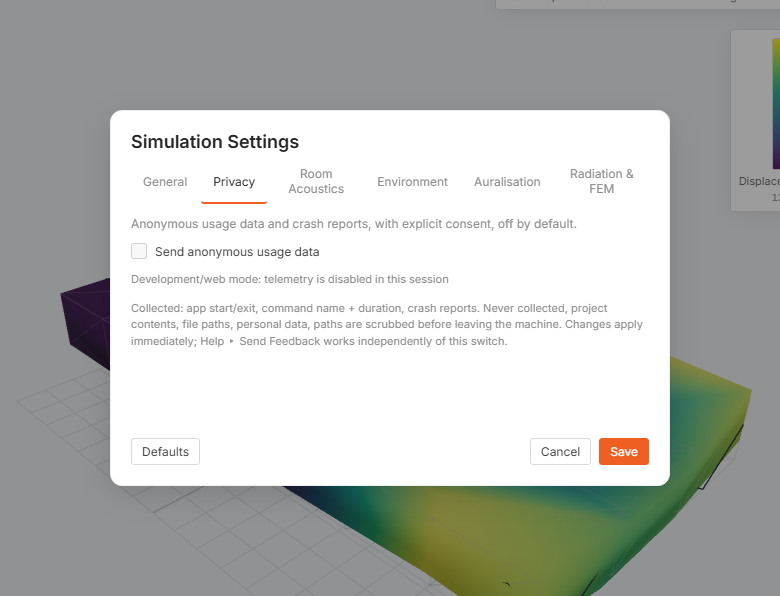
| Collected when the switch is on | Never collected |
|---|---|
| Application start and exit; for each run, the command name, its duration and whether it succeeded; the application and OS version; crash reports. | Project contents: geometry, meshes, materials, results, signals. File paths and user names, scrubbed on your machine before anything is sent. Personal data. |
Events are keyed to a random Install ID, shown on the same tab and selectable so you can copy it. Telemetry never carries a licence key, so it cannot be linked to your licence. To have your telemetry deleted, send this ID to support.
The tab also shows Local log file: the rotating log on your own disk, capped at 1 MB with five older files kept. It never leaves the machine on its own.
Help ▸ Send Feedback… is independent of this switch. Pressing it is the consent for that one message.
Licence management
inWaves validates its licence online at every launch. Open Settings ▸ License… to see the current state:
| Row | What it shows |
|---|---|
| Key | Your key, masked. |
| Plan | Trial or Full. |
| Expiry date | The end of the term, or perpetual when there is none. |
| Machine ID | The first characters of this machine's identifier. Quote it to support; only a one-way hash of the hardware identifier ever leaves your computer. |
Release this machine frees the seat. Do this before you move to another computer. Otherwise the new machine meets a full seat count and activation is refused with a seat-limit message pointing at the portal. This installation then asks for activation again at its next launch; project files on disk are untouched.
At renewal there is nothing to do in the application: the next launch validates against the new term and picks up the new expiry date. If the term lapses, the launch gate reports “The license has expired” and offers Open the license portal, where you renew and release or re-assign seats. Retry appears only when the server could not be reached at all.
There is no offline mode. If the licence server cannot be reached the application does not open: you get the gate with Retry, not a reduced-function session. Plan for this on air-gapped or intermittently connected machines.
Where your data lives on disk
On Windows, everything the application keeps for itself sits under %LOCALAPPDATA%\inWaves:
| Path | What it is |
|---|---|
sessions\<id>.iwp | The live working file. This is the autosave, flushed on every change. |
sessions\<id>.json | Name, target path, whether it had unsaved changes. This is what tells a crash apart from a clean exit. |
sessions\<id>.lock | An OS lock held while the session is live. The kernel drops it the instant the process dies, so a crashed session can be offered back to you on the next launch. |
recent.json | The recent-projects list on the welcome screen, ten entries deep; paths that have vanished are filtered out. |
logs\inwaves.log | The rotating application log, 1 MB per file, five kept. |
Your own project files live wherever you saved them. Save and Save As… write a single self-contained .iwp; nothing in the folders above is needed to open one elsewhere.
Change Ray count, press Save, and watch the title bar mark the project unsaved. Now change Interface language: the interface switches immediately and the project stays clean.
Ranges and defaults here are read from the shipping build. If a field in your copy clamps to a different limit, check the version under Help ▸ About.